What a cart email looks like with your brand
On the left, the usual cart email. On the right, the same text with the brand of Cala Home, a sample store.
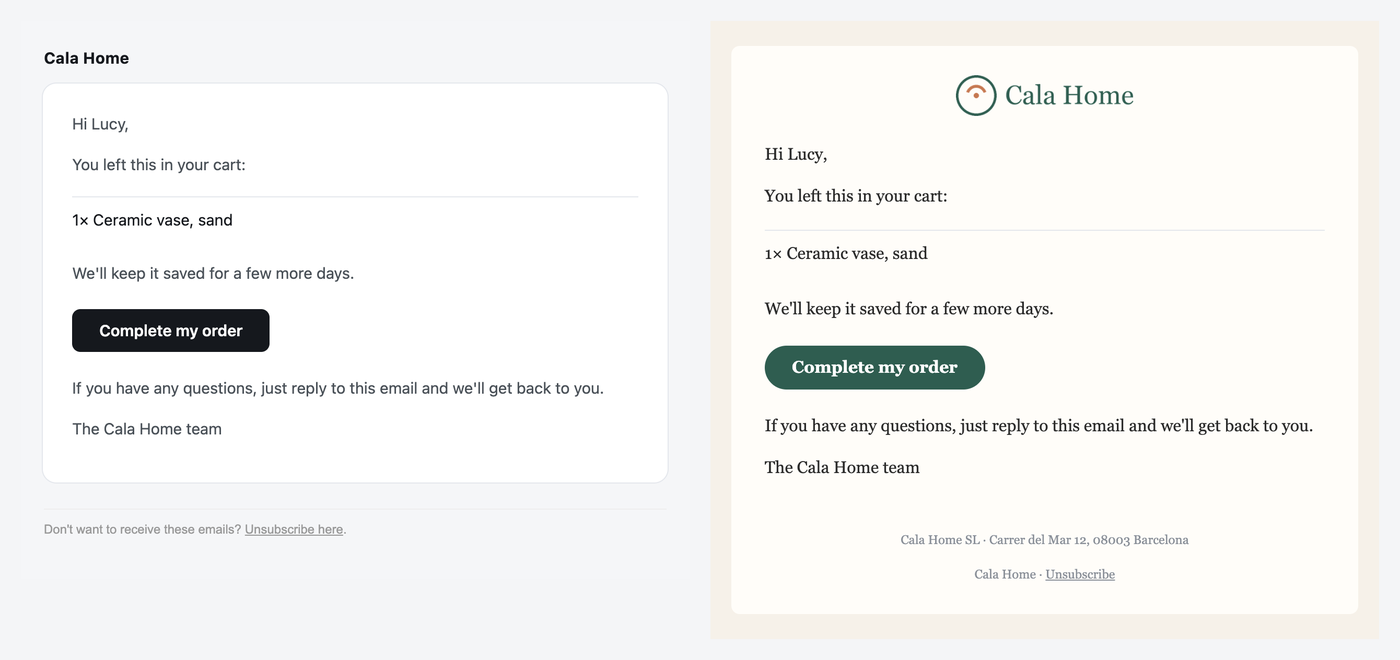
- Your logo at the top and your business's legal name in the footer.
- The button back to the cart, in your color.
- Your font across the whole email.
- The text is the same, word for word.
And in your support replies
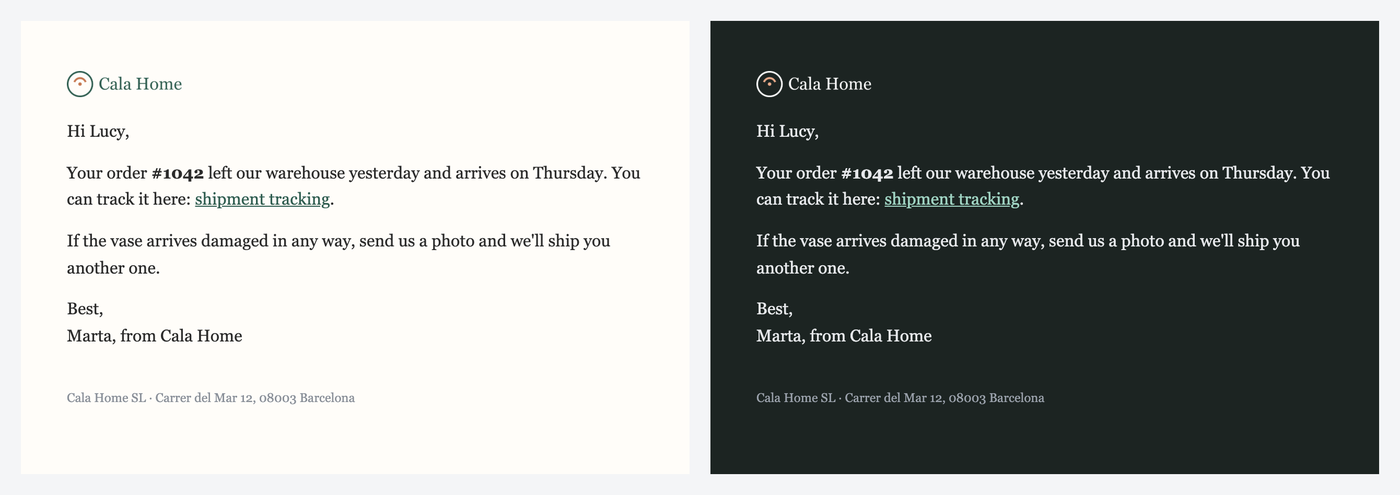
Replies get a quieter frame: a small logo, your colors on the links and your footer. No background and no card, on purpose. A reply that looks like a newsletter ends up in the Promotions tab and your customer never sees it.
How to set it up, step by step
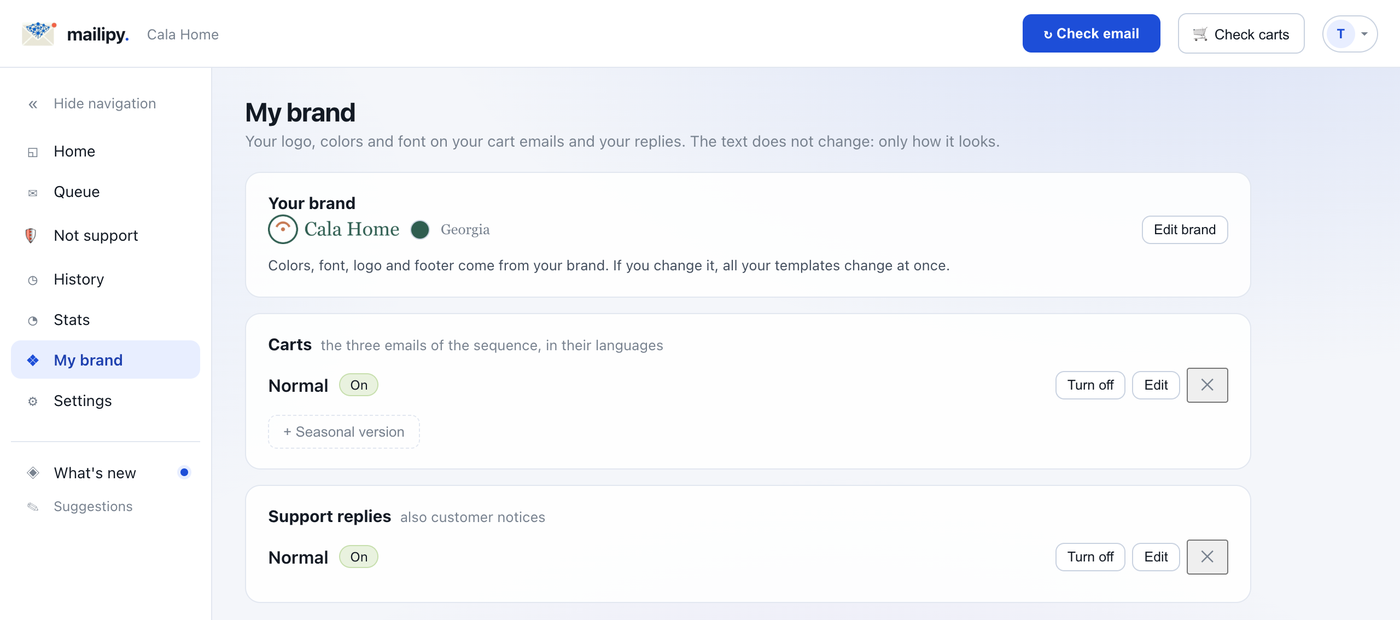
Open «My brand»
It's in the mailipy portal menu, right above Settings.
Upload your logo
A PNG with a transparent background works best. If you upload a JPG or a PNG with the background baked in, we warn you: in dark mode it would show as a box.
Pick your colors and your font
We suggest colors taken from your own logo. The fonts are the ones every computer and phone has, so the email looks the same in Gmail and in Outlook.
Write the footer
Your business's legal name and an address. On cart emails we always add the unsubscribe link.
Review it on your real emails
You see your latest replies and your cart copy with the brand applied, on desktop and mobile, in light and dark mode. And you send yourself a test.
Put it in use
Each template is switched on with one button. For it to reach your customers you need the Plus plan or higher.
Dark mode: what your customer sees in each email app
Your brand has two palettes, light and dark. The dark one is calculated for you and you can change it color by color. You can also upload a logo made for dark backgrounds, for example in white. Each email app handles it its own way:
| Email app | What it does in dark mode |
|---|---|
| Apple Mail (iPhone, iPad and Mac) | Uses your dark palette and switches to the dark-background logo. |
| Outlook for Mac | Uses your dark palette. |
| Outlook.com and Outlook for iPhone and Android | Darkens the email its own way. Your palette is only partly applied. |
| Gmail (web, iPhone and Android) | Doesn't read the dark palette. It darkens the email its own way and leaves images as they are. |
Source: Can I email, @media (prefers-color-scheme) support, checked on October 4, 2026.
That's why a logo with a transparent background matters most: it's the only thing that looks right everywhere.
Why the logo sometimes doesn't show
Some email apps don't show images from a sender they don't know until your customer taps «show images».
Your cart emails go out from your own address if your domain has SPF and DMARC. If not, they go out from a mailipy address with your store's name. Sending from your own address helps the logo show.
You don't have to click anything: mailipy checks your domain every day and switches on its own as soon as the records are published.
How much it costs
| Plan | My brand |
|---|---|
| Free | You set it up and send yourself tests. Your emails go out without it. |
| Pro · $15/month | You set it up and send yourself tests. Your emails go out without it. |
| Plus · $29/month | It reaches your customers. Plus 300 support drafts and 750 cart emails a month. |
| Max · $49/month | It reaches your customers. 750 support drafts and 2,000 cart emails a month. |
Plans are billed on your Shopify invoice, like any other app.
Questions
Does it change the text of my emails?
No. The draft you approve and your cart copy go out the same. The brand only changes the frame: logo, colors, font and footer.
Can I have a Christmas or Black Friday version?
Yes, for cart emails. You create a seasonal version with a start and an end date. While it runs, that one goes out, and when it ends the regular one comes back.
What format should my logo be?
A PNG with a transparent background, around 400 pixels wide or more. A JPG works too, but in dark mode it will show as a white box.
Do I need to know design or HTML?
No. You pick logo, colors, font and footer, and mailipy builds the email. If you want, you can move blocks or add useful links to your replies, like order tracking.
Can I try it without paying?
Yes. Setting it up, seeing it on your emails and sending yourself tests is free on every plan. You only need Plus or higher for it to reach your customers.